I Chased the New Thing (MCPs) Until I Saw the Old Thing (Bash) Clearly
I was determined to master MCPs - maintaining 9 servers, troubleshooting constantly. Then I noticed Claude Code's 'fallback' to bash/curl when MCPs failed. That fallback worked better. Every time. Here's what I learned.
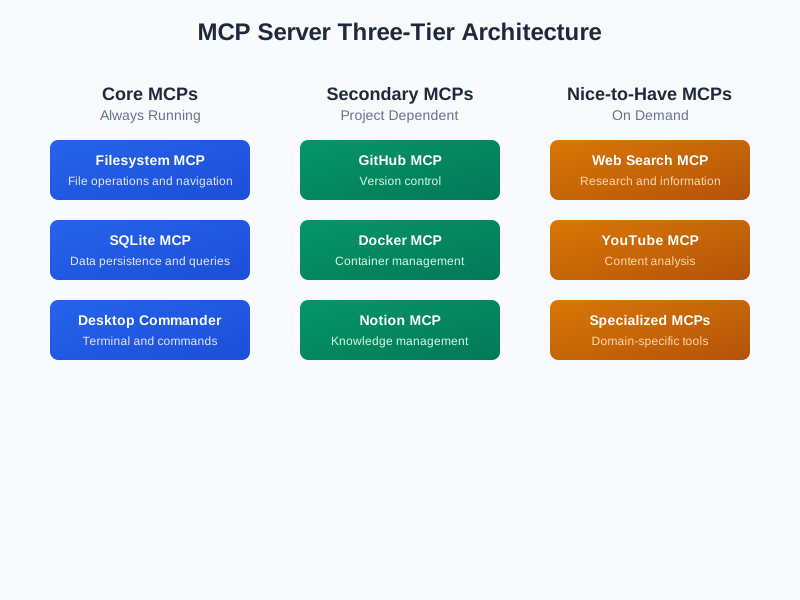
I Chased the New Thing (MCPs) Until I Saw the Old Thing (Bash) Clearly
I was determined to master Model Context Protocol (MCP) servers. Nine of them configured. GitHub, Google Analytics, time lookups, databases - all running through MCPs. This was the “right” way to integrate with Claude, right? The official protocol. The modern approach.
When they broke (which was constant), I’d troubleshoot for hours. Authentication issues? Debug the config. Server timeouts? Restart and hope. Every failure was a challenge to overcome, not a signal to reconsider. I was going to make this work.
Then one day I noticed something odd: when an MCP failed, Claude Code would fall back to bash/curl/API calls. Just… use the API directly. And it worked. Instantly. No configuration. No server. No authentication dance.
Wait. The fallback works?
I stared at the terminal. That curl command just executed in seconds. Clean. Reliable. Done.
That’s when it hit me: I’d been treating the better solution as the backup plan.
Here’s what I learned. It might help you too.
Prerequisites
The bash/curl examples in this article require:
- jq: JSON processor (
brew install jq) - gh: GitHub CLI (
brew install gh) - gcloud: Google Cloud SDK (optional, for Google API examples)
All examples use bash commands available on macOS/Linux. If you’re following along, these tools will make the examples work out of the box.
What I Was Chasing
MCPs seemed like the future. Official Anthropic protocol. Structured tool interfaces. The “professional” way to integrate with AI. When Claude Desktop launched MCP support, I was all in.
I spent January through March 2025 building my setup:
- GitHub MCP for repository operations
- Google Analytics MCP for metrics
- Time MCP for date lookups
- Database MCP for SQLite queries
- Five others for various APIs
Each one required configuration. JSON files. Environment variables. Authentication flows. But that was fine - I was mastering the new tooling. This is what serious AI development looked like, right?
When things broke (and they broke constantly), I’d troubleshoot:
- “Server initialization failed” → Check the config
- Authentication errors → Regenerate tokens
- Silent timeouts → Restart the server
- Version conflicts → Downgrade dependencies
I treated every failure as a puzzle to solve. I was determined to make this work.
But here’s what I wasn’t seeing: I was spending more time maintaining tools than using them.
The MCPs weren’t making me faster. They were keeping me busy.
The Moment I Saw It
I was troubleshooting yet another MCP failure when I noticed something in Claude Code’s output:
GitHub MCP failed to connect. Falling back to direct API call...
$ gh pr create --title "Fix navigation" --body "Closes #123"
✓ Created pull request #456
Wait. What?
The “fallback” just… worked. Instantly. No configuration. No server startup. No authentication dance. Just executed a command and returned a result.
I pulled up the logs. This was happening constantly. When MCPs failed (which was daily), Claude Code would quietly use bash/curl/API calls instead. And those always worked.
The fallback was more reliable than the primary approach.
That’s when it clicked: I’d been doing this backwards. I was treating direct API calls as the “ugly workaround” when they should have been the main approach.
Bash, curl, native CLIs - they weren’t the fallback. They were:
- ✓ Already installed
- ✓ Already authenticated
- ✓ Already debugged by thousands of developers
- ✓ Already documented
- ✓ Zero configuration
- ✓ Instant execution
I’d been so focused on mastering the new thing that I couldn’t see what was already working.
What I Learned: Choose Tools That Work
After switching approaches, here’s the pattern that emerged:
Need to integrate with a service?
  ↓
Does a native CLI exist? (gh, gcloud, stripe, npm)
  ↓ YES → Use it (companies maintain these, they work)
  ↓ NO
  ↓
Does the service have a REST API?
  ↓ YES → Use curl/bash (direct, no intermediaries)
  ↓ NO
  ↓
Does it need browser automation or complex state?
  ↓ YES → Now consider MCP
  ↓ NO → Probably don't need one
The pattern is simple: fewer points of failure = more reliable system.
Each layer you add (MCP server, authentication, configuration) is another place things can break. Most tasks don’t need those layers.
Start with what works. Add complexity only when you need it.
Real Examples: Before and After
Let me show you what this looks like in practice.
Example 1: GitHub Pull Requests
The MCP Way:
// .config/claude/mcp_config.json
{
  "mcpServers": {
    "github": {
      "command": "npx",
      "args": ["-y", "@modelcontextprotocol/server-github"],
      "env": {
        "GITHUB_PERSONAL_ACCESS_TOKEN": "ghp_xxxxxxxxxxxx"
      }
    }
  }
}
Then hope the server starts, authenticates, doesn’t hit rate limits, and provides the exact tool you need.
The Direct API Way (What I Discovered):
# Create PR with direct API call
curl -X POST \
  -H "Authorization: token $GITHUB_TOKEN" \
  -H "Content-Type: application/json" \
  https://api.github.com/repos/owner/repo/pulls \
  -d '{
    "title": "Fix navigation bug",
    "body": "Closes #123",
    "head": "feature-branch",
    "base": "main"
  }'
Or use the gh CLI (which is just a wrapper around the API):
gh pr create --title "Fix navigation bug" --body "Closes #123"
Direct API call. Works immediately. No server to maintain. This is what Claude Code was falling back to when the MCP failed.
Example 2: Google Analytics Data
The Hypothetical MCP Way:
{
  "mcpServers": {
    "google-analytics": {
      "command": "npx",
      "args": ["-y", "@some/analytics-mcp"],
      "env": {
        "GOOGLE_APPLICATION_CREDENTIALS": "/path/to/creds.json",
        "GA4_PROPERTY_ID": "123456789"
      }
    }
  }
}
Configuration complexity, authentication setup, hoping someone maintains the MCP.
The Bash Way:
Prerequisites: Requires Google Cloud SDK. Install via:
brew install --cask google-cloud-sdk
gcloud auth application-default login
Then query analytics directly:
# Query analytics
TOKEN=$(gcloud auth application-default print-access-token)
curl -H "Authorization: Bearer $TOKEN" \
  "https://analyticsdata.googleapis.com/v1beta/properties/123456789:runReport" \
  -H "Content-Type: application/json" \
  -d '{
    "dateRanges": [{"startDate": "7daysAgo", "endDate": "today"}],
    "dimensions": [{"name": "city"}],
    "metrics": [{"name": "activeUsers"}]
  }' | jq '.rows[] | {city: .dimensionValues[0].value, users: .metricValues[0].value}'
Direct API access. Full control. Debuggable. The official Google approach is to use gcloud + REST APIs, not some third-party wrapper.
Example 3: LLM Cost Optimization
This one’s my favorite because it shows how bash can save you real money.
The Problem: Using Claude tokens for every AI task burns through your budget fast. Reading documentation? $0.30. Generating boilerplate? $0.20. For a conversational tool, costs add up quickly.
Note: Cost estimates are approximations based on Claude API pricing and typical usage patterns. Your actual costs may vary.
The Solution: Free LLM APIs (Groq, Gemini) via curl for non-critical tasks.
# Research using free Groq API
GROQ_KEY=$(cat ~/Workspace/mcp/groq-mcp/.env | grep GROQ_API_KEY | cut -d= -f2)
curl -s https://api.groq.com/openai/v1/chat/completions \
  -H "Authorization: Bearer $GROQ_KEY" \
  -H "Content-Type: application/json" \
  -d '{
    "model": "llama-3.3-70b-versatile",
    "messages": [{"role": "user", "content": "Summarize Next.js 15 changes"}],
    "max_tokens": 2000
  }' | jq -r '.choices[0].message.content'
Cost comparison:
- Using Claude for docs research: $0.30 per query
- Using Groq via curl: $0.00 per query
- Savings on 20 queries/day: ~$180/month
Claude is expensive because it’s good. Save those tokens for tasks that require judgment and reasoning. Use free APIs for factual lookups and boilerplate generation.
Example 4: Time Lookups
The MCP Trap: “I need timezone info, better install a time MCP!”
The Bash Reality:
# Local time
date "+%Y-%m-%d %H:%M:%S %Z"

# Different timezone
TZ="America/New_York" date "+%Y-%m-%d %H:%M:%S %Z"

# Or use a simple API
curl -s "http://worldtimeapi.org/api/timezone/America/New_York" | jq '.datetime'
Time lookups are stateless one-shot operations. You don’t need a server for this.
When MCPs ARE Actually Worth It
Let’s be fair: MCPs aren’t bad. They’re just overused. Here are scenarios where they genuinely add value:
Browser Automation
{
  "mcpServers": {
    "playwright": {
      "command": "npx",
      "args": ["-y", "@playwright/mcp"]
    }
  }
}
Why it’s worth it: Browser automation is inherently complex. You need stateful sessions, screenshot capture, DOM interaction. A well-designed MCP abstracts this complexity. The alternative (writing Playwright scripts manually every time) is actually harder.
Multi-Agent Coordination
MCPs shine for stateful workflows across multiple AI sessions:
{
  "mcpServers": {
    "claude-code-swarm": {
      "command": "node",
      "args": ["/path/to/swarm/index.js"]
    }
  }
}
Why it’s worth it: Coordinating multiple Claude sessions, managing shared state, task delegation—this requires infrastructure. The MCP handles session pooling, task tracking, and communication patterns you’d otherwise implement yourself.
The Criteria
Use an MCP when:
- The task requires browser automation
- You need stateful multi-step workflows
- The alternative requires writing complex parsers
- Multiple tools need to coordinate
- The MCP is officially maintained by the service provider
Don’t use an MCP when:
- A native CLI exists (
gh,gcloud,stripe) - The service has a simple REST API
- The operation is one-shot (time lookup, API call)
- You’re adding it “just in case”
The Impact: What Changed
Here’s what happened when I simplified:
Before (9 MCPs):
- GitHub MCP (replacing
gh) - Google Analytics MCP (replacing
gcloud+ curl) - Time MCP (replacing
date) - Weather MCP (replacing curl)
- Database MCP (replacing
sqlite3) - 4 others I barely used
Result: 2 MCPs constantly failing, 45-second Claude startup time, frequent authentication issues
After (3 MCPs):
- Playwright (browser automation)
- Claude Code Swarm (multi-agent coordination)
- SQLite (structured query interface for complex databases)
Result: Zero failures, 8-second startup time, everything just works
Metrics:
- Startup time: 45s → 8s (82% reduction)
- Configuration files: 9 → 3 (67% reduction)
- Authentication failures: Weekly → Never
- Time spent debugging: Hours → Minutes
But the real win? I’m building things again instead of debugging infrastructure.
The Deeper Lessons
1. See the existing engineering work
Unix tools represent decades of edge cases solved by millions of engineers. That’s not “old tech” - that’s battle-tested reliability. Don’t reinvent what’s already perfected.
2. Architect AI to leverage proven workflows, not replace them
The best AI integrations accelerate existing reliable workflows. Build on top of what works. Let AI use the tools that have already been perfected.
3. Reduce friction strategically
Speed up safe operations: Reading data, querying APIs, fetching information - remove every unnecessary layer.
Slow down risky operations: Deployments, deletions, writes - add friction where mistakes are expensive. Don’t blow up.
4. Configuration is a liability
Every config file is technical debt. Every environment variable is a failure point. Every layer is a place things break. Minimize what you need to maintain.
5. Official tools beat third-party wrappers
GitHub maintains gh. Google maintains gcloud. Companies invest in their CLIs because they’re the primary interface. Use them directly.
Who This Is For (And Who It’s Not)
This might not resonate if you’re still figuring out how to use Claude effectively. That’s fine - we all start there.
But if you’re past the “wow, AI works!” phase and into the “how do I make this faster?” phase, this pattern might help.
Most developers are still adapting to AI: “Will this replace me? How do I survive?” I get it. I was there too.
But some of us have moved from survival to mastery - from “adapt or die” to “how do I push these tools to their limits?” That’s where I found these patterns.
You might be early like me, or you might find this obvious. Either way, I’m sharing what worked. Your mileage may vary.
If You Want To Try This
If you’re maintaining multiple MCPs and spending more time on tools than results, here’s what helped me:
Week 1: Audit your MCPs
# List what you have
cat ~/.config/claude/mcp_config.json

# For each one, ask:
# - Do I actually use this?
# - Is there a simpler alternative?
# - What would break if I removed it?
Week 2: Replace one MCP with bash
Pick your least reliable MCP. Find the native CLI or REST API. Replace it. See if you miss it.
Week 3: Document your patterns
Create a decision framework for your team. “We use curl for APIs, native CLIs for services, MCPs for browser automation.” Make it explicit.
Week 4: Measure the difference
Track your Claude startup time. Count authentication failures. Monitor your debugging time. The metrics don’t lie.
What I Actually Learned
I chased the shiny new thing (MCPs) until I saw decades of existing engineering work I’d been ignoring.
The real lesson wasn’t “use bash instead of MCPs.”
The real lesson was: See all the work that past engineers built into the command line Unix workflow. Use it. Architect AI to leverage the workflow that’s already been perfected.
Unix tools aren’t “old” - they’re battle-tested by millions of engineers over decades. They work because they’ve had every edge case beaten out of them. When Claude Code “fell back” to bash/curl, it wasn’t falling back - it was using the most reliable path.
Here’s what I learned about architecting AI workflows:
Reduce points of failure. Reduce friction.
- Each layer adds failure modes
- Speed up by removing unnecessary layers
- Direct API calls = fewer things that can break
Until you need friction to slow down risky parts.
- Fast for safe operations (reading data, querying APIs)
- Careful for risky operations (deployments, deletions, writes)
- Strategic slowness prevents blow-ups
Don’t blow up.
- Speed up until you need caution
- Add friction where mistakes are expensive
- Trust the proven workflows
Three months ago: 9 MCPs, constant failures, 45-second startups Today: 3 MCPs, zero failures, 8-second startups, leveraging Unix tools AI architects ignored
The difference? I saw the engineering work already embedded in command-line tools and architected AI to use it, not replace it.
This worked for me. Your workflow might be different. But if you’re building on top of Unix, there’s decades of engineering work waiting to be leveraged.
Resources
The decision framework and API patterns referenced in this article are part of my personal Claude configuration system. Key documents include:
- Direct API Access Reference (
~/.claude/api-direct-access.md) - Bash/curl patterns for 50+ services - Integration Decision Framework (
~/.claude/patterns/claude-code-dynamic-mcp-installation.md) - When to use MCPs vs bash - Multi-LLM Cost Optimization (
~/.claude/bundles/subagents-reference.md) - Token-saving strategies
These are private documentation files from my Claude Desktop setup. If there’s interest, I may open-source the complete configuration framework.
Want to see the full framework? Check out my Claude Desktop optimization guide for decision trees, code examples, and the complete bash alternatives reference.
Using Claude for development? My multi-LLM cost optimization strategy shows how to use free APIs (Groq/Gemini) for research while saving Claude tokens for judgment tasks—same approach as the MCP decision framework.
Written by Dean Keesey